
Learn how to subscribe to webhook events for wallets in your projects
Webhooks let you subscribe to certain events and get notified when those events happen. In this guide we'll setup a webhook to listen for Transfer events for all wallets in the project.
Use Cases
If you are continuously polling the API for updates, then you can use webhooks to be notified instead. For example, if you want to run an action if a wallet in your project receives a transfer, you can use webhooks to be notified as soon as there is a transfer either to or from the wallet.
Setup
Make sure you do the following first:
- Setup your WalletKit account
- Buy some gas. You can do this from the dashboard. Have 0.01 MATIC available, although we'll use a lot less.
- Have a web server application running locally
Steps Overview
At a high level, you will be performing the following steps:
- Creating an endpoint on your local server that listens for webhook events.
- Setting up a webhook on WalletKit and configuring it with your newly created endpoint.
- Testing the webhook with a transfer event.
Webhook Handler
WalletKit will send an HTTP POST request to your web server to let you know about a subscribed event. To handle this notification, you need to create an HTTP endpoint on your web server that can receive these requests.
For example, you can create an endpoint that listens for POST requests at /api/webhooks/walletkit. Then, have the endpoint handler log any incoming requests so that we can later see when an event arrives.
To make your web server accessible via the internet, follow these steps:
- Install ngrok
- Run
ngrok http <local-port> - Note the "Forwarding" address, which should look similar to
https://abcd-123-45-678-90.ngrok.io
The webhook handler endpoint is now accessible at https://abcd-123-45-678-90.ngrok.io/api/webhooks/walletkit
Create Webhook
To create a new webhook:
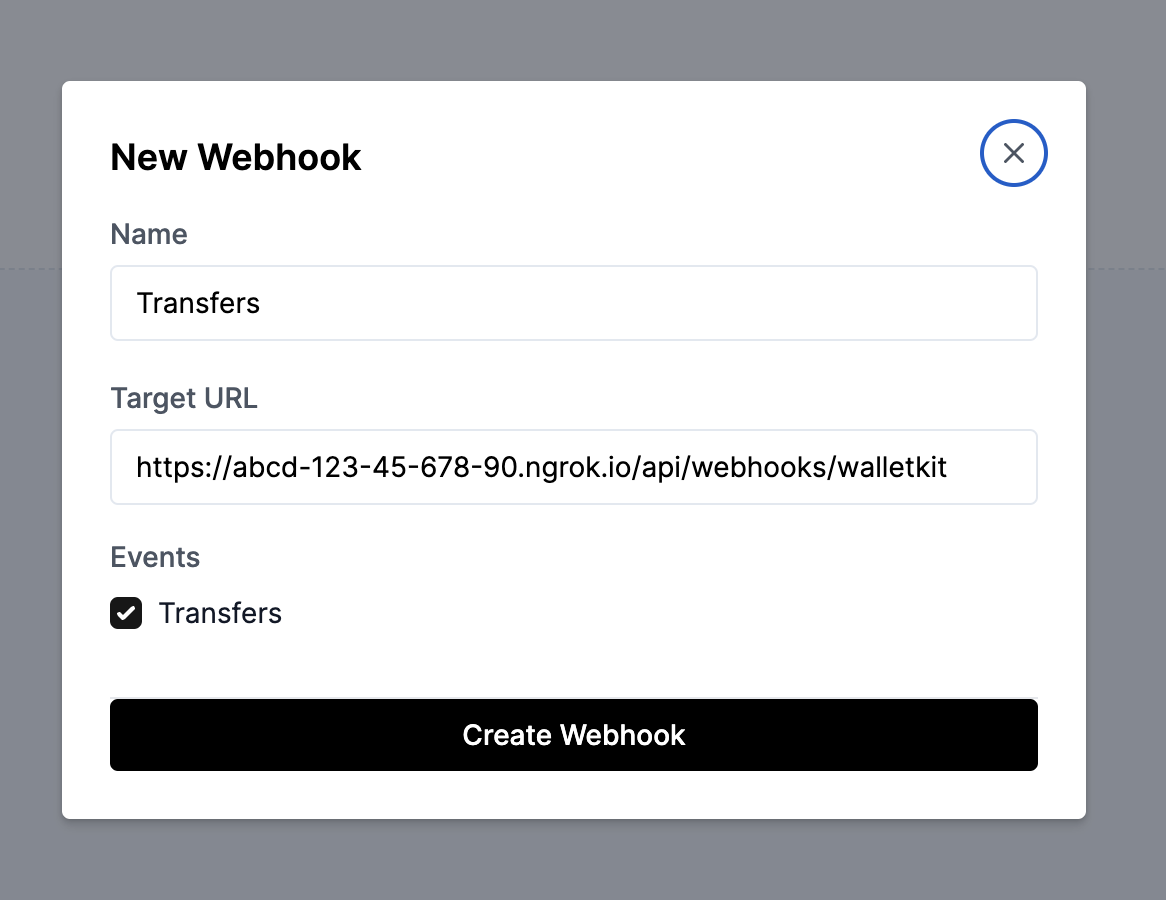
- Go to the Webhooks page on the dashboard.
- Click "New Webhook" and give it a name.
- Copy the endpoint from the previous step (
https://abcd-123-45-678-90.ngrok.io/api/webhooks/walletkit). - Paste it as the Target URL.
- Select the "Transfers" events box.
- Click "Create Webhook".
Test it out
Go to the “Overview” page and initiate a transfer. Once the transaction goes through, you will receive a webhook event on your handler!
2023/07/13 14:45:11 [INFO] Received echo webhook where body={
"Type":"TRANSFER",
"Payload":{
	"network":"Polygon",
	"timestamp":"2023-07-13T19:45:05.317Z",
	"from":"0xbc56ca0e4f4e749be3c3a274331dd54812acc58a",
	"to":"0x000000000000000000000000000000000000dead",
	"token":"MATIC",
	"amount":"0.0001",
	"removed":false
}}